Never Lose Track of Your Group

Real-time location sharing built for group rides

Group rides are amazing until someone gets separated. With Motoavir's live tracking, see exactly where every rider is on the map β€” in real-time.

The Problem

Group Rides Shouldn't Be This Stressful

We've all been there β€” the frustration of losing track of riders during a group trip

😰

Riders Get Separated

Someone misses a turn, gets stuck at a light, or stops for fuel. Now you're playing phone tag trying to regroup.

πŸ“±

WhatsApp Live Location is Limited

WhatsApp's live sharing expires after 15 minutes or 8 hours max. For multi-day trips, this means constantly resharing.

πŸ—ΊοΈ

No Trip Context

Generic location sharing doesn't show the planned route, who's riding lead vs sweep, or trip-specific details.

πŸ”‹

Safety Concerns

When a rider falls behind or has an issue, you don't know until they call β€” precious time wasted in emergencies.

Motoavir's Live Ride Tracking: Stay Connected, Ride Confident

Our live tracking is purpose-built for group rides. Every trip member appears on the map with their profile photo, name, and current speed. See the entire group at a glance.

Privacy-first design: Your location is shared only with trip members. For public trips, non-members need a passcode. For private trips, access is members-only β€” no exceptions.

  • βœ“
    Real-time MQTT updates every 5 seconds β€” smoother than GPS polling, updates the instant someone moves
  • βœ“
    Custom markers with profile photos β€” instantly recognize who's where (blue = you, green = trip leader, orange = others)
  • βœ“
    Route visualization on the map β€” see the planned path from start to destination overlaid on Google Maps
  • βœ“
    Live speed display β€” see each rider's current speed (km/h or mph based on your preference)
  • βœ“
    Trip statistics β€” max speed, average speed, total distance automatically calculated
  • βœ“
    Background tracking on Android β€” foreground service keeps tracking even when you lock your phone
  • βœ“
    Public & Private trip modes β€” Private trips are members-only. Public trips allow non-member viewing with a 4-digit passcode
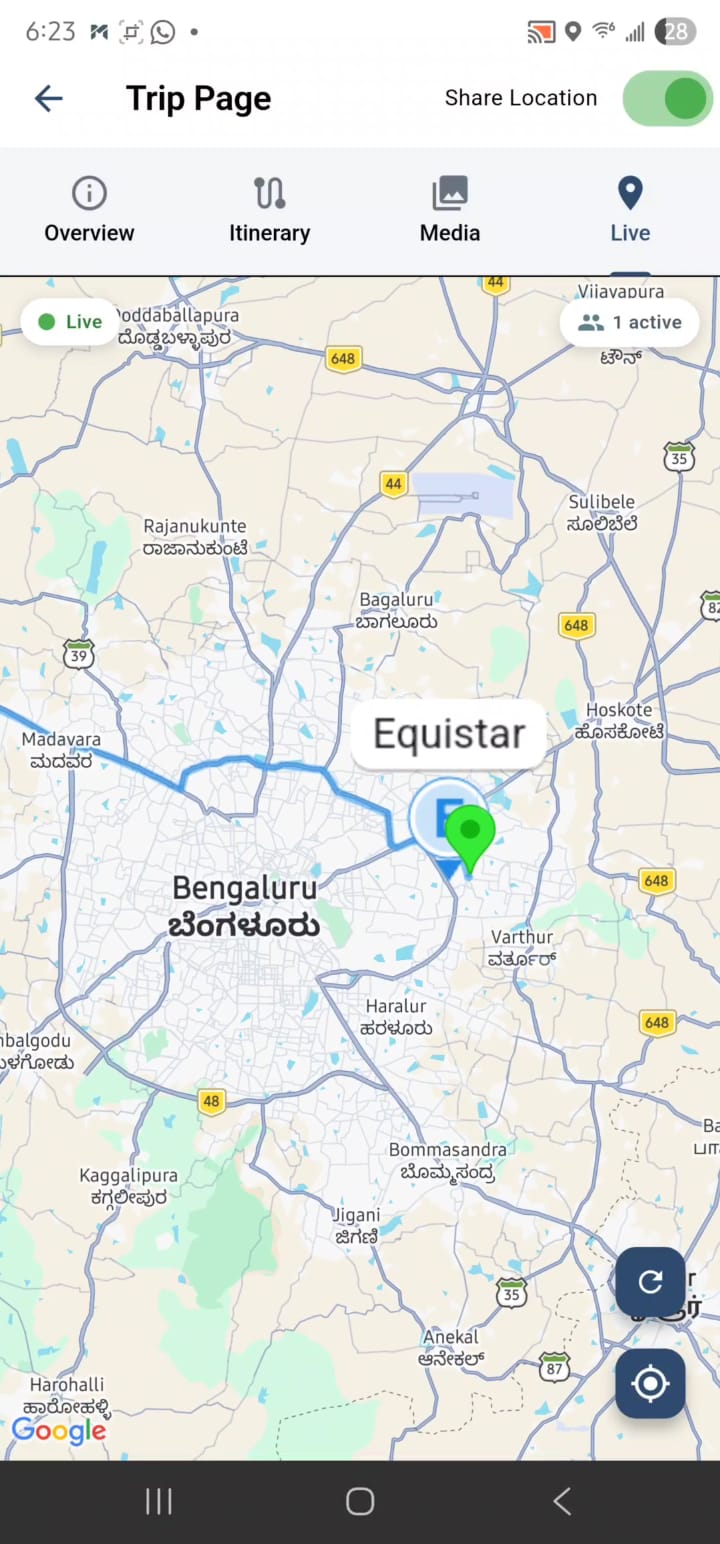
Motoavir - Trip with users
How It Works

Dead Simple. Works Instantly.

No setup, no configuration β€” just tap and track

1

Create or Join a Trip

When you create a trip or get invited to one, the Live Tracking tab appears once the trip status changes to "Started" or "Ongoing".

2

Toggle "Share Location"

Open the trip, go to Live Tracking tab, and flip the switch in the app bar. On Android, you'll see a disclosure dialog on first use (location is shared only with trip members).

3

See Everyone on the Map

Your location is broadcast every 5 seconds via secure MQTT. All active trip members appear on the map with profile photos, names, and real-time speed.

4

Track & Navigate

Use the "Center on Me" button to recenter the map. Tap the "Refresh" button to force an update. See trip stats update in real-time as you ride.

Privacy & Access Control

Your Location, Your Rules

Live tracking respects your privacy with granular control over who sees your location

Public vs Private Trips

When you create a trip, you choose whether it's Public or Private. This setting determines who can view the live tracking.

  • πŸ”“
    Public Trips: Anyone can view the trip details (route, waypoints, photos). However, live tracking is passcode-protected. The trip creator sets a 4-digit passcode displayed only to them. Non-members who want to view live tracking must enter this passcode.
  • πŸ”
    Private Trips: Only invited members can view anything about the trip β€” including live tracking. No passcode needed because access is restricted to the member list.
  • βœ“
    Member-Only Sharing: Your live location is always shared only with trip members (or passcode holders for public trips). It's never visible to random users browsing the app.
  • βœ“
    Opt-In Always: Even if you're a member, you must manually toggle "Share Location" to start broadcasting. Location sharing never happens automatically.
  • βœ“
    Passcode Display: For public trips, the passcode is shown in the trip overview tab β€” only visible to the trip creator. Share it with friends/family who want to follow along.

πŸ’‘ Use Case Example

Scenario: You're organizing a public charity ride with 50 riders. You create a Public Trip so anyone can see the route and join. You set a passcode 123456.

What Happens:

  • 50 riders join the trip as members β†’ they see live tracking without needing the passcode
  • Your family/friends who aren't riding can open the trip β†’ they need to enter 123456 to view live tracking
  • Random users browsing public trips can see the route but cannot view live tracking without the passcode
Benefits

Why Riders Love Live Tracking

πŸ›‘οΈ

Safety First

Know instantly if someone falls behind or stops unexpectedly. React faster in emergencies when you can see exactly where they are.

πŸ“ž

Less Phone Juggling

No more pulling over to text "Where are you?" or calling riders during the ride. Everyone's location is already on your screen.

🎯

Better Pacing

Lead riders can see if the group is spread too thin and adjust pace. Sweep riders know when someone needs help without guessing.

πŸ”

Privacy Protected

Your location is shared ONLY with trip members. For public trips, non-members need a 4-digit passcode from the trip creator to view. Private trips are locked to members only β€” no passcode option.

πŸ”‹

Efficient Battery Use

Android's foreground service keeps tracking in the background without draining battery like constant GPS polling would.

πŸ“Š

Ride Memories

Trip stats (max speed, average speed, distance) are automatically saved when you stop sharing. Relive the ride later with full tracking data.

Ready to Ride Together?

Download Motoavir and never lose track of your group again